DataHawk
Optimise every lever of your eCommerce business with unified marketplace data. AI-powered insights, automated reporting to grow revenue and increase profit.
LOADING
Appy AI brings persistent AI coworkers to Slack and Teams, helping finance, sales, marketing, and operations teams coordinate work and deliver useful business results.
 Appy AI Coworkers
Justification: Appy.AI provides a persistent team of specialised AI coworkers that can coordinate and complete business tasks through communication platforms such as Slack. Its finance, marketing, sales, and operations agents connect with business tools and produce work outputs, making it more than a general-purpose chatbot or writing assistant. The site describes its agents as remembering business context and operating autonomously.
Businesses are increasingly looking beyond AI chatbots that answer questions. They want tools that can understand company context, work with existing software, and help move tasks forward. Appy.AI is built around that idea: a team of specialised AI coworkers that users can engage through familiar communication channels, including Slack. Instead of assigning a single generalist to handle every job, teams can call on agents focused on areas such as finance, sales, marketing, and operations.
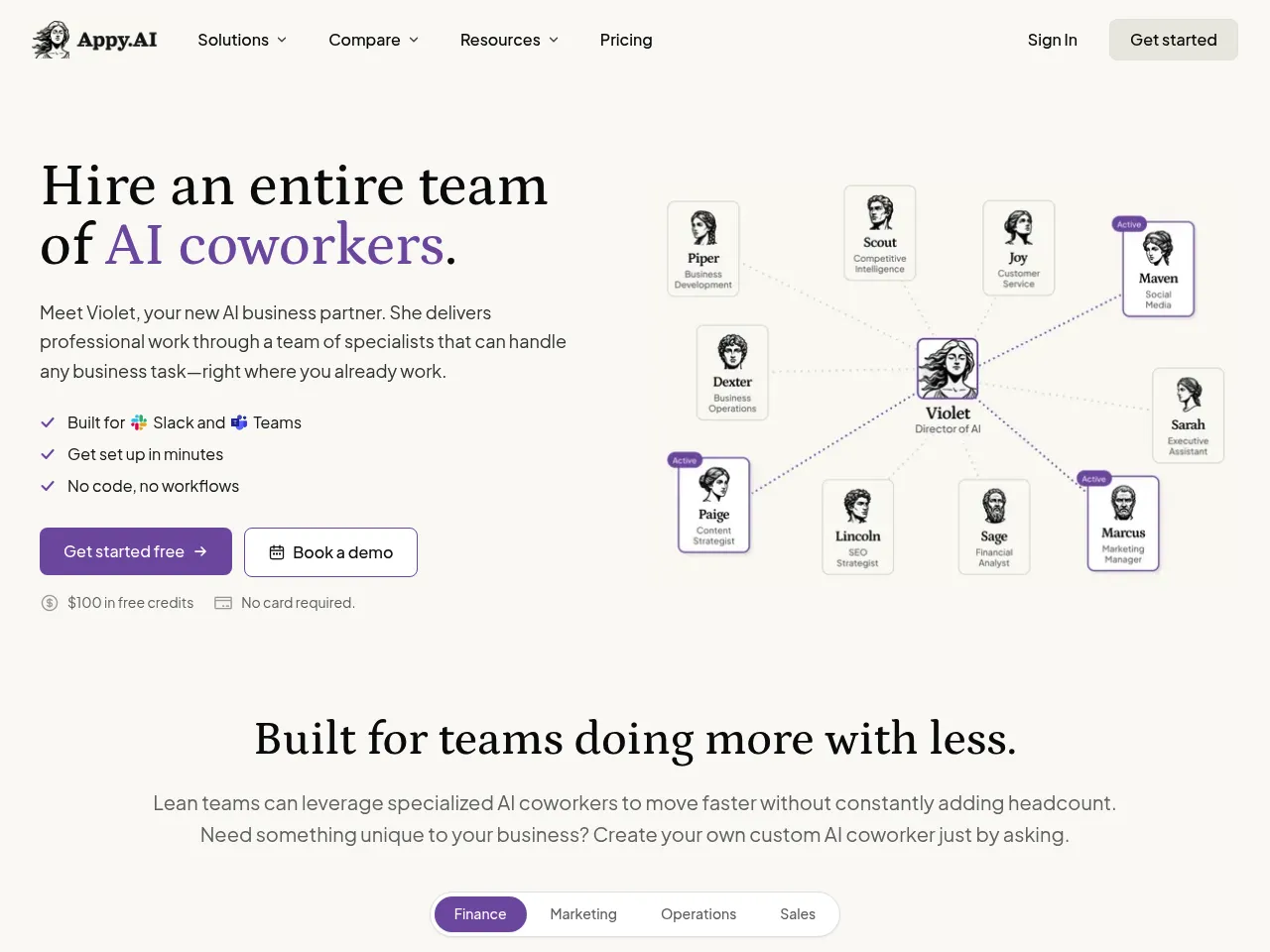
This review explains what Appy.AI does, how to use it, what is known about its pricing, and where it may fit into everyday work. It also considers practical strengths, limitations, and competing tools. If you’re exploring AI automation platforms, this guide can help you decide whether Appy.AI’s coworker model suits your organisation.
Appy.AI is a business AI platform that presents its agents as a persistent team of coworkers. The company says these agents can remember information about a business, coordinate with one another, and carry out work through natural-language requests rather than requiring users to build workflows or write code.
The product’s central idea is that people should be able to work with AI in the places where collaboration already happens. On its website, Appy.AI highlights Slack and Microsoft Teams and describes how to start a task by tagging Appy in a channel. It promotes specialist groups for finance, marketing, sales, and operations, with connections to business services such as Google Sheets, QuickBooks, Ramp, HubSpot, Stripe, Gusto, and advertising platforms.
In short, Appy.AI aims to turn business requests into useful deliverables by combining specialised agents, business context, and integrations. Those capabilities make it relevant to teams that want assistance with recurring analysis, research, campaign work, or operational tasks without adopting a separate automation builder.
Appy.AI organises its agents by business function. A finance coworker is positioned to help with finance-related work, while marketing and sales coworkers are aimed at their respective teams. The company also presents operations as a functional area for AI assistance.
The specialist model gives users a clearer starting point than a blank chat window. Rather than having to explain the role of an assistant from scratch each time, someone can address an agent that is already designed around a department’s kinds of tasks.
Appy.AI describes its platform as having agents that “remember your business.” The goal is to give AI workers useful context about company processes and information, so users can make requests without having to restate every background detail.
This is the promise behind terms like Appy AI that knows your business and Appy AI that works before you ask. These phrases describe the intended product experience: agents that can use business context and help advance work. As with any AI system, users should verify what information is retained, how it is used, and what controls are available before connecting sensitive company data.
The Appy.AI website describes Slack as a central place to start tasks by tagging Appy in a channel. It also highlights Microsoft Teams as one of its workplace channels. This can make it easier for teams that already use chat for requests, approvals, and coordination to try the product.
An Appy AI Slack channel can serve as a shared space for requests and results. This may help keep AI-assisted work visible to colleagues, though teams should set clear channel permissions and avoid sharing confidential information where it does not belong.
Appy.AI promotes integrations with tools used across finance, marketing, and sales. Its homepage names Google Sheets, Excel, QuickBooks, Ramp, Brex, HubSpot, Stripe, Gusto, LinkedIn Ads, and Meta Ads among examples, and says there are many more integrations.
Connections to familiar tools are important because business tasks often depend on data that lives outside a chatbot. Depending on the available integration and permissions, users may be able to ask agents to reference information, analyse it, or help prepare work products. Confirm the exact scope of action for each integration before relying on it for important tasks.
Appy.AI says its agents can coordinate and produce “real deliverables.” That positioning suggests the platform is intended to support more than conversation: users ask for work, and the agent team helps produce an output that can be reviewed and used.
The practical value depends on the request, the connected services, and the extent of human review required. A draft campaign plan, spreadsheet analysis, or research summary may be a useful first version, but teams should still validate facts, numbers, and external-facing content.
The company promotes a no-code, chat-based experience and says teams can get started through Slack and run without building workflows themselves. A typical onboarding process may look like this:
- Create an account. Visit the Appy.AI website and use its signup flow or request a demo if you want to discuss team requirements first.
- Connect your workplace channel. Set up the channel your team intends to use, such as Slack or Microsoft Teams, and review what access the integration requests.
- Choose the relevant coworker. Direct a task to the finance, marketing, sales, or operations agent that best matches the work.
- Write a specific request. Include the goal, relevant background, preferred format, deadline, and any constraints. For example, ask for a summary of a defined set of campaign results rather than “analyse marketing.”
- Connect only necessary business tools. If the task requires information from a spreadsheet, accounting system, CRM, or advertising account, authorise the relevant integration and verify its access level.
- Review the result. Confirm that figures, sources, assumptions, and recommendations are accurate before using the output in a decision or sending it to a customer.
- Refine the request. Give concise feedback when the result needs changes, and note any repeatable instructions the team wants the agent to follow.
The best results are likely to come from clear, bounded tasks. “Prepare a weekly sales pipeline summary from these records, flagging deals with no recent activity” is more actionable than “help sales.” For work involving money, customer data, or external communications, human review remains essential.
Appy.AI’s homepage invites visitors to get started for free and book a demo. Still, the search results reviewed for this article did not show a definitive public pricing table on the homepage. Appy.AI’s own blog describes workspace-based plans, a stated $100 in free credits to start, and no per-seat charge; those details should be confirmed directly with Appy.AI, as plans and offers can change.
That means potential customers should not assume a specific monthly cost based on the available public information. Before adopting the service, ask the company to clarify:
- What the free credits cover and when they expire
- The price and included usage for each paid plan
- Whether usage is charged by credits, tasks, connected services, or another measure
- Whether there are limits on users, integrations, agent activity, or data retention
- What security, administrative, and support features are included
- Whether a demo or trial is available for the intended team size
Workspace-based pricing without a per-seat fee could be attractive for a team that wants multiple coworkers to use a shared AI workspace. The actual value, however, depends on usage limits and how well the agents complete work that would otherwise take employee time.
A finance coworker may assist with recurring spreadsheet analysis, expense or cash flow summaries, and the organisation of information from connected accounting or finance systems. Small companies with lean finance teams may be interested in an Appy AI back-office approach to reduce manual coordination.
For example, a finance lead might request a summary of monthly spend, ask for notable changes to be highlighted, then review the findings before sharing them. Appy.AI lists integrations such as QuickBooks, Google Sheets, Excel, Ramp, Brex, Stripe, and Gusto on its homepage. The exact operations supported by each connection should be checked with the vendor.
A sales coworker could help organise prospect research, prepare meeting briefs, or summarise activity from a CRM. Teams may use an Appy AI sales coworker to reduce time spent switching between tools and assembling information before customer conversations.
Any AI-generated prospect details should be checked for accuracy and relevance. Sales representatives should also ensure their use of customer information complies with company policies and applicable privacy requirements.
Marketing teams may use an Appy AI marketing coworker to help with campaign planning, launch checklists, or the analysis of advertising results. Appy.AI highlights integrations such as LinkedIn Ads and Meta Ads on its homepage.
A practical workflow might involve asking for a campaign brief based on defined objectives and audience information, then reviewing the proposed messaging and performance data. Human editors should verify claims, brand voice, and platform-specific requirements before publication.
Operations teams often handle repeated requests that involve multiple departments or systems. An Appy AI operations coworker could help gather information, structure a process update, or prepare a summary for a team discussion.
Chat-based access can be useful when employees already coordinate work in Slack or Teams. The potential benefit is reducing the number of steps between asking for help and receiving a first draft or analysis. The team should still decide which tasks can be delegated and which require an authorised employee.
Smaller organisations may not have dedicated specialists for every function. A set of Appy AI teammates could assist departments without requiring a company to purchase a separate AI product for each task. The most realistic use is augmentation: agents can help with preparation, summarisation, and coordination, while people retain responsibility for judgment, approvals, and relationships.
- Department-focused agents: Finance, sales, marketing, and operations roles give teams a practical way to frame requests.
- Familiar interaction model: Starting work in Slack or Teams may be easier than learning a complex automation builder.
- Business tool integrations: The homepage promotes integrations with common finance, CRM, spreadsheet, and advertising tools.
- Designed for deliverables: Appy.AI positions its agents as coworkers that can help produce work, rather than only answering general questions.
- Shared team use: Workspace-oriented access may suit teams that want colleagues to work with a common set of AI agents.
- No-code positioning: The company says users can interact through natural conversation without building workflows.
- Pricing needs confirmation: A clear, definitive public pricing table was not available in the reviewed homepage information. Buyers should confirm costs and limits with the company.
- AI outputs require review: Financial summaries, sales research, and marketing content can contain errors or unsupported assumptions.
- Integration access requires care: Connecting accounting, CRM, or advertising tools may expose sensitive data or permit actions that need governance.
- Not a replacement for accountability: AI agents do not assume legal, financial, or managerial responsibility for decisions.
- Value depends on fit: Teams with simple workflows or strict tool requirements may find a specialist coworker platform unnecessary.
- Vendor details matter: Prospective customers should investigate data retention, security controls, permissions, and the precise capabilities of each integration.
The right alternative depends on whether a company wants ready-to-use AI coworkers, a customizable agent-building platform, or a general assistant.
- Relevance AI: A platform for building and deploying custom AI agents and teams. It may suit organisations that want more control over agent design and are prepared to configure their own systems. Appy.AI’s comparison page characterises Relevance AI as infrastructure for building agents and Appy as a managed specialist team in Slack.
- Lindy: A general AI assistant and automation platform that can connect tasks across apps. It may be worth comparing for teams that want broad automation, but verify the current channel support, workflow limits, and pricing before choosing.
- Microsoft Copilot: A natural option for organisations already invested in Microsoft 365. Its value may be strongest when the work takes place in Microsoft applications, although its role and feature set differ from Appy.AI’s coworker-first positioning.
- Slack AI and Slack automation features: Teams that primarily need help within Slack can evaluate built-in AI and workflow features before adding another platform. These may be sufficient for summarisation or routine channel tasks, depending on the organisation’s plan.
- Zapier: A no-code automation platform focused on connecting applications and triggering workflows. It is often a better fit when the task is a predictable sequence of events rather than a conversational AI coworker.
- Make: A visual automation platform for designing integrations and multi-step workflows. It offers flexibility for teams willing to configure processes, but it is not the same as receiving a pre-organised department-oriented AI team.
A useful comparison should include the tools the business already pays for, the required integrations, the amount of setup the team can manage, and the level of human approval needed. Appy.AI’s ready-team approach is most compelling when ease of interaction and functional specialisation matter more than control over custom workflows.
Appy.AI may be worth evaluating for small and midsize businesses that want AI help across several departments and already coordinate work in Slack or Teams. It may also appeal to founders who need assistance preparing analyses, campaign materials, or sales research but do not want to build an agent system from scratch.
The Appy AI business partner idea is best understood as an assistant to employees, not a replacement for a co-founder or department lead. Similarly, the Violet AI and Appy AI business partners can describe the platform’s collaborative positioning. Still, buyers should assess what the named agents actually do in a trial or demo rather than relying on labels alone.
If your organisation already has an automation team, detailed compliance requirements, or workflows that must follow strict rules, compare Appy.AI with configurable agent platforms and traditional automation tools. Ask for a demonstration using a representative task and test the result against your current process.
Appy.AI offers an appealing approach to business AI: a team of specialised coworkers accessible through familiar workplace chat, with integrations designed to bring company information into the workflow. Its focus on finance, marketing, sales, and operations gives prospective users a clearer starting point than a blank, general-purpose assistant. The platform’s “AI that knows your business” promise also addresses a genuine frustration with tools that require users to repeat context in every conversation.
Its strongest potential is for teams that want practical assistance with recurring knowledge work and prefer not to build agent workflows themselves. The main questions to resolve are the current plan cost, credit and usage limits, data handling, integration permissions, and the reliability of outputs for the tasks that matter to your business.
Overall, Appy.AI is a promising automation tool listing for organisations curious about AI coworkers. Treat it as a way to extend team capacity, not as an autonomous decision-maker, and begin with low-risk tasks that are easy to review. If a trial or demo confirms that its agents produce useful results with your actual systems and processes, Appy.AI could become a valuable addition to the company’s everyday workflow.
The content provided on this site, AISoftRadar, specifically Appy AI Coworkers, is sourced from the internet. We do not guarantee the accuracy or completeness of any external links, nor do we exercise actual control over the destinations to which these links point. At the time of indexing (2026-11-09 5:29 PM), the content on the linked pages was compliant and lawful. Should any content on these pages subsequently become non-compliant or illegal, please contact the site administrator to request its removal. AISoftRadar assumes no liability in this regard.