Zoomtopia-2026: Zoom advances its AI strategy with a new Unified Context Layer – turning meeting conversations into completed work
Zoom Wants AI to Do More Than Take Meeting Notes
Artificial intelligence is changing how businesses communicate, collaborate and manage everyday tasks. However, while many AI tools can summarise meetings, generate reports and answer questions, organisations still face a significant challenge: turning the information discussed in conversations into actual business outcomes.
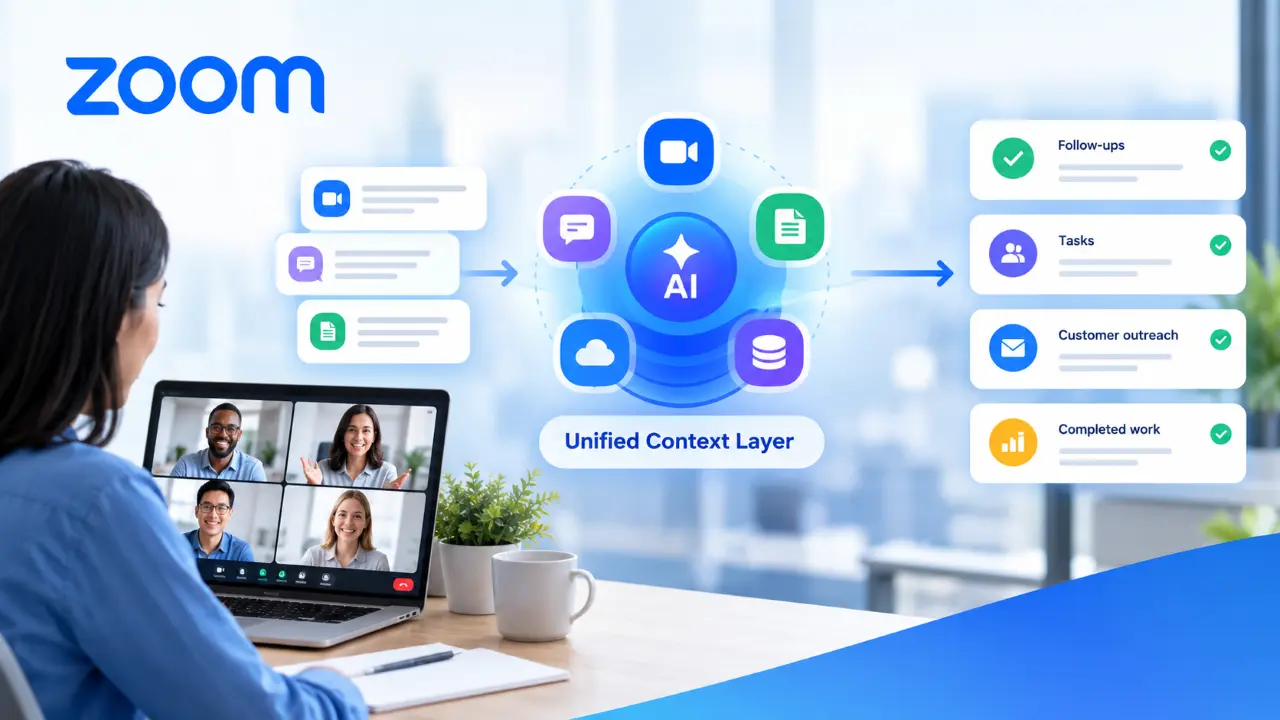
Zoom is addressing this challenge with its new Unified Context Layer, announced at Zoomtopia 2026 on 20 October 2026. The technology is designed to connect meeting conversations, chat messages, documents and information from connected business applications, helping employees and AI agents understand what has happened and determine what needs to happen next.
According to Zoom’s official Zoomtopia 2026 announcement, the company is expanding its AI strategy beyond communication and productivity assistance towards a more action-oriented approach. Its objective is to reduce the gap between discussing work and completing it.
The announcement introduces a broader collection of AI-powered capabilities spanning Zoom Workplace, customer experience, developer tools and events. Together, these developments could change how organisations manage follow-ups, retrieve information, coordinate projects and serve customers.
What Is Zoom’s Unified Context Layer?
The Unified Context Layer is a technology foundation designed to bring together relevant business information and conversation history, enabling people and AI agents to work with a more complete understanding of organisational activities.
In many businesses, information is distributed across multiple platforms. A sales team might discuss a customer requirement during a Zoom meeting, exchange additional details through chat, record an opportunity in a customer relationship management (CRM) system and store a proposal in a separate document repository.
Although these systems contain valuable information, employees often have to move between applications to reconstruct the complete picture. Important decisions may be buried in transcripts, action items may remain in personal notes, and customer requirements may not be reflected in the systems used to manage ongoing work.
Zoom’s Unified Context Layer aims to address this fragmentation by connecting conversation intelligence with documented company knowledge and information from integrated third-party applications.
This approach is important because an AI assistant becomes more useful when it can consider relevant business context rather than responding to isolated instructions. Understanding what a customer requested, what a team agreed to deliver and which deadlines were established can help an AI system provide more relevant assistance.
Zoom is therefore positioning the Unified Context Layer as a foundation for moving from information retrieval towards coordinated action.
Why Turning Conversations Into Action Matters
Meetings are central to business decision-making, but their value depends on what happens afterwards. Employees may spend considerable time discussing priorities, assigning responsibilities and identifying solutions, only to lose momentum when they return to their individual tasks.
Traditional meeting tools primarily help users communicate, record discussions and capture summaries. However, the responsibility for translating those summaries into emails, CRM updates, project tasks and follow-up communications often remains with employees.
This creates several operational problems.
First, manual follow-ups consume time that could be spent on more valuable activities. Second, information can become inconsistent when employees transfer details between applications. Third, delayed actions can affect customer satisfaction, project delivery and internal coordination.
Zoom’s new strategy aims to make the transition from conversation to execution more seamless. Instead of simply documenting what was discussed, AI-powered capabilities can help retrieve relevant information, organise decisions and initiate workflows in connected tools.
For example, after a sales meeting, a team could use meeting context to prepare a follow-up message, identify outstanding customer requirements and update relevant CRM information. Employees would still need to review important outputs and approve consequential actions where appropriate, but less of the process would depend on manually reconstructing the conversation.
The potential benefit is not merely faster note-taking. It is reducing the administrative work between making a decision and acting on it.
Key AI Innovations Announced at Zoomtopia 2026
Zoom’s announcement includes several capabilities that support its broader vision. Availability varies by feature, so businesses should distinguish between products available now and those planned for future release.
1. My Notes Workflows: Automating Meeting Follow-Ups
My Notes Workflows is designed to transform meeting summaries into follow-up activities in tools such as Zoom Chat and Salesforce.
The feature includes ready-made workflows for sales, marketing and IT, while allowing users to describe custom automations in natural language. This could make workflow creation more accessible to employees without extensive technical or programming skills.
Consider a marketing team discussing a new campaign. After the meeting, an automated workflow could help organise agreed actions, prepare follow-up communications and transfer relevant information into the team’s existing tools.
Similarly, a sales team could use meeting summaries to support customer follow-ups and maintain more consistent CRM records.
According to Zoom, My Notes Workflows was expected in October 2026. Businesses should check the current product documentation for rollout status and supported integrations.
2. Follow the Meeting: Keeping Absent Employees Informed
Employees cannot attend every meeting, particularly in organisations operating across different time zones or departments.
Zoom’s Follow the Meeting capability is designed to provide personalised transcripts and AI-generated summaries to people who miss all or part of a meeting. This helps employees catch up on discussions without necessarily requiring colleagues to repeat the entire conversation.
The feature is expected to make meeting participation more flexible while helping teams maintain continuity.
For example, a project manager who misses a planning session could review the summary, identify key decisions and understand the outstanding responsibilities before resuming work.
Zoom announced this capability for December 2026, making it important to verify availability before incorporating it into business processes.
3. Enriched Notes: Connecting Discussions With Visual Information
Meeting transcripts do not always capture the complete meaning of a discussion. Participants may refer to a chart, presentation slide, shared screen or message that provides essential context.
Zoom’s Enriched Notes capability is designed to link visual material and in-meeting chat with relevant moments in searchable transcripts.
This could make it easier to revisit technical demonstrations, financial presentations and project reviews. Rather than searching through an entire recording, employees could locate the relevant discussion and associated visual information.
Zoom announced the feature for November 2026.
4. ZoomMate Agent Teams: Coordinating AI-Powered Work
Another important development is ZoomMate Agent Teams, which uses specialised AI agents to work on different parts of a project.
Rather than relying on a single assistant to handle every task sequentially, an AI team can divide work among specialised agents, coordinate their contributions, and consolidate the resulting outputs for human review.
For instance, a business preparing a project proposal might use specialised agents to organise background information, structure requirements and draft sections of a deliverable.
This approach could reduce the time required to coordinate complex tasks. However, the quality of the final result will still depend on the accuracy of the source information, the suitability of the agents’ assigned tasks and appropriate human oversight.
Zoom states that ZoomMate Agent Teams are available now.
5. A Refreshed Zoom Chat Experience
Zoom is also introducing a redesigned chat experience intended to make relevant conversations easier to find and bring AI agents directly into discussions.
The goal is to help teams move from exchanging information to taking action without repeatedly switching between applications.
AI agents operating within chat could assist with retrieving context, answering questions and supporting authorised tasks. Administrative controls are intended to govern how these capabilities are used.
The refreshed Zoom Chat experience was announced for December 2026.
Connecting Zoom With Other AI Tools and Business Applications
One of the most significant aspects of Zoom’s strategy is that its AI capabilities are not intended to remain confined to the Zoom application.
Through application programming interfaces (APIs) and Model Context Protocol (MCP) servers, developers and AI agents can connect supported Zoom capabilities with external AI environments and business workflows.
MCP is a protocol that helps AI applications interact with compatible tools and data sources. In this context, it can provide a way for supported AI assistants to access Zoom functionality without requiring every task to begin inside the Zoom interface.
Zoom also announced Search & Ask APIs that allow supported AI environments and MCP-compatible agents to query its Unified Context Layer. The company identified integrations and connections involving platforms such as Claude, ChatGPT, Codex, Microsoft Copilot and Gemini, subject to the capabilities and availability of the relevant integrations.
This flexibility could benefit organisations that already use several AI platforms and want to incorporate meeting intelligence into their established workflows.
For example, an employee working in an external AI assistant might need to retrieve a decision from an earlier meeting before drafting a project update. Access to relevant Zoom context could reduce the need to search manually through separate transcripts and chat histories.
The potential advantage is a more connected digital workplace in which employees can use business information where they already work, rather than constantly moving between disconnected applications.
What Does This Mean for Customer Experience?
Zoom’s AI strategy also extends to customer experience (CX), where continuity between interactions is particularly important.
Customers may contact an organisation through phone, chat or other service channels. If information from earlier interactions is unavailable, they may need to repeat their concerns, while support agents spend time reconstructing the customer’s history.
Zoom is introducing capabilities intended to bring customer context together across channels.
Its planned Customer Profiles feature is designed to provide dynamic customer information across interactions. CX Insights Transcript Intelligence is intended to classify voice, chat and email transcripts and make them searchable through natural-language queries alongside operational information, such as handling time and service outcomes.
These capabilities were announced for November 2026.
If implemented effectively, they could help service teams identify recurring problems, understand customer needs and make better-informed decisions. AI-powered self-service is another part of the strategy, with Zoom Virtual Agent – Kiosk designed to support customer requests at physical retail locations.
For businesses, the broader opportunity is to use AI not only to accelerate internal administration but also to improve the consistency and responsiveness of customer service.
Security, Governance and Responsible AI Adoption
As AI systems become more capable of accessing information and performing tasks, organisations must consider how to maintain security, privacy and accountability.
A unified context layer can improve access to business information, but connecting multiple systems also introduces governance considerations. Not every employee or AI agent should have unrestricted access to confidential customer records, financial information or sensitive internal discussions.
Zoom says its strategy includes configurable access controls and centralised AI management capabilities. The company also announced Sensitivity Labels that can integrate with Microsoft Purview or use native Zoom labels to apply policies to sensitive content. This capability is available to select Zoom Workplace customers.
Other announced developments include AI Guardrails, designed to establish account-level rules for AI-generated responses, and Deepfake Risk Detection tools intended to flag potential synthetic media. These capabilities were announced for future releases.
Businesses implementing AI-powered workflows should establish clear policies covering data access, information retention, human approval and the use of AI-generated content. They should also test automated processes before allowing them to perform consequential actions.
Importantly, AI-generated summaries and recommendations can contain errors or omit important details. Employees should therefore verify critical information, especially when dealing with legal obligations, financial decisions, regulated industries or sensitive customer interactions.
The objective should be to automate repetitive work while maintaining meaningful human oversight.
How Businesses Can Benefit From Zoom’s AI Strategy
Zoom’s Unified Context Layer could create opportunities across several business functions.
- Sales and marketing: Sales representatives could use conversation history to prepare personalised follow-ups, maintain customer records and identify outstanding requirements. Marketing teams could turn campaign planning discussions into organised tasks and follow-up activities.
- Human resources: HR teams could use meeting summaries to document decisions, coordinate recruitment activities and track agreed responsibilities, subject to appropriate privacy and access controls.
- Project management: Teams could retrieve earlier decisions, identify action items and coordinate work across departments without repeatedly searching through disconnected applications.
- Customer support: Support agents could gain a more complete view of customer interactions, potentially reducing repeated questions and helping them resolve issues more efficiently.
- IT operations: IT teams could use connected context to coordinate incident discussions, document decisions and automate routine administrative workflows.
The value in each case depends on how well organisations integrate the technology with existing processes. AI adoption alone does not guarantee productivity improvements; businesses must identify suitable use cases, establish reliable workflows and measure results.
Challenges Businesses Should Consider
Despite its potential, Zoom’s approach is not without challenges.
- Integration complexity: Organisations often operate a mixture of legacy systems, specialised applications and cloud platforms. Connecting these environments may require technical configuration, permissions management and process redesign.
- Information quality: AI systems depend on the quality and relevance of the information available to them. Incomplete transcripts, outdated documents and inconsistent customer records can undermine the accuracy of AI-generated outputs.
- Employee adoption: Employees may be reluctant to rely on automated workflows if they do not understand how the systems operate or how their information is being used. Training and clear communication will be important.
- Governance requirements: Organisations must ensure that AI access and automated actions comply with their security policies, privacy obligations and industry-specific requirements.
- Measuring return on investment: Businesses should assess whether the technology reduces administrative effort, improves response times, increases task completion rates or delivers other measurable benefits. They should also consider implementation and ongoing operating costs.
These challenges reinforce the importance of treating AI as part of a wider digital transformation strategy rather than simply introducing another software feature.
The Future of AI-Powered Workplace Productivity
Zoom’s Unified Context Layer reflects a broader direction in enterprise technology: moving from AI tools that primarily generate information towards systems that can help coordinate and execute work.
The distinction is significant. A meeting summary explains what happened, while a connected workflow can help translate the discussion into assigned tasks, customer communications or updates to business systems.
Zoom’s approach combines conversation intelligence, business data, third-party integrations and specialised AI agents. This creates the possibility of a more connected environment in which the information generated during everyday interactions becomes useful throughout the work process.
However, the long-term success of this approach will depend on execution. Businesses will need reliable integrations, transparent controls, accurate information and appropriate human supervision to turn these capabilities into consistent business results.
The development also signals that competition in workplace AI is increasingly about more than the quality of an individual assistant. The ability to connect information, understand organisational context and support work across multiple applications could become an important differentiator.
Conclusion: From Conversations to Completed Work
Zoom’s Unified Context Layer represents an important development in the company’s AI strategy. Announced at Zoomtopia 2026, it is designed to connect meeting conversations, chat messages, documents and business application data so that employees and AI agents can work with a more complete understanding of organisational activities.
Combined with My Notes Workflows, ZoomMate Agent Teams, enhanced search capabilities, and customer experience innovations, the approach aims to reduce the manual effort required to turn discussions into practical outcomes.
For businesses, the opportunity lies in spending less time reconstructing conversations and managing repetitive follow-ups, and more time delivering value to customers and advancing organisational priorities.
Nevertheless, effective implementation will require careful attention to security, data quality, integration, employee adoption and human oversight.
As enterprise AI continues to evolve, the organisations most likely to benefit will be those that connect intelligent technology to clearly defined business processes. Zoom’s latest announcements indicate that its next phase of AI development is focused on precisely this challenge: helping businesses move beyond conversations and make measurable progress towards completed work.
Source: Zoom’s official Zoomtopia 2026 announcement, published 20 October 2026.
Editorial note: Product availability dates and capabilities in this article reflect Zoom’s announcement as of 29 October 2026. Some features were planned for later releases, so check Zoom’s official website for current availability.
© Copyright notes
The copyright of the article belongs to the author, please do not reprint without permission.
Related posts


No comments...