
Rytr
Discover Rytr, a general-purpose, affordable AI writing assistant. Craft high-quality content faster than ever before. Start for free and upgrade as you grow!
LOADING
Fyxer is an AI Work Assistant for email, calendars, meetings, and team tasks, helping professionals save time and keep client work moving every day.
 Fyxer
Justification: Fyxer fits best in Assistive AI Tools because it helps people manage everyday work across email, calendars, meetings, and team communication. Its main purpose is to assist with routine professional tasks, such as prioritising messages, drafting emails, preparing for meetings, and coordinating follow-ups, rather than creating standalone content or serving primarily as a research or coding tool.
Keeping up with email, meetings, calendar changes, and follow-up tasks can take up a large share of the workday. Fyxer is an AI work assistant designed to help professionals manage these activities across connected tools. It can organise communications, prepare for meetings, draft replies, and support shared workflows, aiming to reduce time spent on administrative work.
This review explains what Fyxer does, how to use it, what its plans cost, where it may be useful, and how it compares with other AI productivity tools. Fyxer’s pricing page lists Free, Pro, Team, and Enterprise options, with Pro and Team rates varying according to billing frequency.

Fyxer is an AI assistant for work across email, chat, calendars, and meetings. It is designed to help individuals and teams handle communications and recurring work without constantly switching between separate apps. The product connects with services including Gmail, Outlook, Google Calendar, Outlook Calendar, Slack, Microsoft Teams, Zoom, Google Meet, and HubSpot. It also lists integrations with ChatGPT and Claude. Available features may depend on the plan, connected services, and account configuration.
Fyxer is best suited to users who manage busy inboxes, schedule frequent meetings, or need to keep client conversations and follow-up work organised. Instead of replacing the tools a team already uses, it aims to work alongside them as an administrative and productivity layer.
Fyxer can help users stay on top of email by prioritising messages and preparing drafts. The assistant can learn a user’s writing style to make its suggested replies feel more consistent with their usual communication. This can be useful for routine responses, but the user should review drafts before sending them. Tone, factual accuracy, confidentiality, and the recipient’s context still need human judgment.
Fyxer works with supported calendar and meeting services to help users prepare for upcoming conversations. Its meeting-preparation tools can assemble context and create agendas ahead of scheduled meetings. The product describes automated agenda creation about an hour before a meeting.
The goal is to make it easier to arrive prepared without having to manually gather information from several apps. Users should still check that the agenda and context are appropriate, especially for sensitive or high-stakes meetings.
A daily briefing can help users see what deserves attention, such as important communications or upcoming commitments. Rather than opening multiple applications to rebuild a picture of the day, users can use a summary to orient themselves and plan their next steps.
Briefings are only as useful as the underlying information and prioritisation settings. Users should verify that important messages or deadlines are not being overlooked.
Fyxer offers client “Spaces” for collaboration and shared context. These are intended to help teams keep information and work connected around client relationships or shared streams of work. For teams working across several accounts, centralising relevant context can make handoffs clearer. The benefit depends on whether a team consistently uses the feature and keeps its information up to date.
Fyxer can automate recurring workflows with a single command. This may help reduce repeated administrative steps, such as routine follow-ups or other predictable tasks. Automation is most dependable when the task is well-defined, and the expected result is easy to check. Teams should start with low-risk workflows, review the output, and expand automation only after confirming that it behaves as intended.
The product can use meeting information to update HubSpot profiles. This may reduce manual CRM entry after calls and help sales or client teams keep records more up to date. As with any automated CRM update, users should verify the information before relying on it for forecasting, customer service, or future outreach.
A typical setup begins by signing up and connecting the work accounts the user wants Fyxer to support. Fyxer’s pricing page offers a 14-day free trial and sign-up through Google or Microsoft accounts. Users should review the permissions requested during setup and connect only the services they intend to use. Next, choose relevant integrations, such as email, calendar, chat, video meetings, or a CRM, and configure how the assistant should support daily work. For meeting participation, Fyxer’s FAQ says users can choose which meetings it joins, including all meetings, external meetings, meetings they host, or none.
After setup, users can begin with a few practical tasks:
Teams should also agree on how they will use client Spaces and shared workflows. Clear conventions, such as who owns follow-up and where important decisions are recorded, help prevent duplicated or missed work.
Fyxer’s pricing page lists four options: Free, Pro, Team, and Enterprise. The page shows annual billing rates of USD 37 per person per month for Pro and USD 64 per person per month for Team. It lists monthly rates of USD 49 for Pro and USD 99 for Team, and notes that annual billing saves 25% on Pro and 35% on Team.
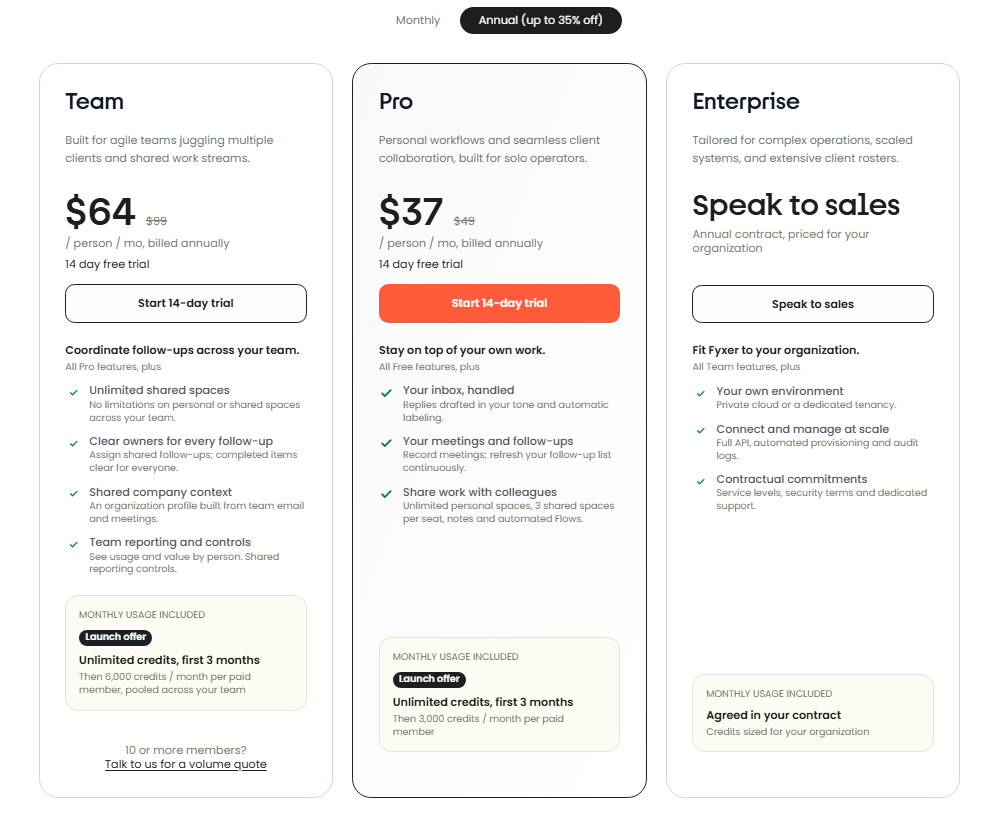
The pricing page offers a 14-day free trial for Pro and Team. It also states that accounts that continue after the trial are billed per user and that teams with 10 or more members can request a volume quote. Because plan details and promotional terms can change, review Fyxer’s current pricing page before purchasing.
Sales professionals can use Fyxer to prepare for client meetings, manage email follow-ups, and support HubSpot updates. These features may help reduce administrative work between calls. Sales teams should still review CRM records and customer-facing messages for accuracy.
People handling multiple client relationships may benefit from shared Spaces and meeting preparation. Teams can use these capabilities to keep context accessible and coordinate next steps, particularly when several colleagues support the same account.
Managers who receive a high volume of messages and attend many meetings may use email prioritisation and briefings to get a clearer view of the day. The value is greatest when the assistant can connect to the user’s relevant work tools and when its summaries are checked rather than treated as infallible.
A compact team may use recurring task automation to handle predictable administrative steps. It can be a practical way to reduce repetitive work, provided the process is straightforward and someone is responsible for monitoring the results.
Fyxer supports services in both Google and Microsoft ecosystems, which may help professionals whose work involves different email, calendar, or meeting platforms. Before adopting it, confirm that the specific integrations required by your organisation are available on the plan you intend to use.
Fyxer is one option in a broad productivity-assistant market. The best alternative depends on whether the main need is email management, meeting notes, scheduling, or broader automation.
These tools do not all offer the same features, integrations, or pricing model as Fyxer. Before choosing, compare the specific functions you need, compatibility with your organization’s software, data policies, and total cost.
Fyxer is best understood as an Assistive AI Tool for professionals and teams who want help managing communications and administrative work across connected apps. Email support, meeting preparation, daily briefings, client Spaces, recurring task automation, and HubSpot updates make it particularly relevant to client-facing teams and people with busy calendars.
Its strongest case is for users who regularly move between email, meetings, calendars, chat, and CRM work. Its value will be lower for someone who needs only a basic writing assistant or rarely handles cross-app workflows. As with any AI assistant connected to workplace information, users should review permissions, check outputs, and verify important records before acting on them.
The 14-day trial gives prospective users a way to test Fyxer against real workflows. Compare its current plan limits and per-seat cost with the time it could realistically save, then decide whether the convenience justifies adding another service to your work stack.
The content provided on this site, AISoftRadar, specifically Fyxer, is sourced from the internet. We do not guarantee the accuracy or completeness of any external links, nor do we exercise actual control over the destinations to which these links point. At the time of indexing (2026-10-31 6:09 PM), the content on the linked pages was compliant and lawful. Should any content on these pages subsequently become non-compliant or illegal, please contact the site administrator to request its removal. AISoftRadar assumes no liability in this regard.


