
Brandmark
Create a unique logo, business card and social media graphics in less than a minute. Build your brand identity with our generative AI.
Create images, videos, music, websites, and browser games with Clico. Bring AI chat, research, and writing into one creative workspace.
 Clico AI
Creative work often involves moving between separate tools: one for writing prompts, another for generating images, a video editor for turning visuals into clips, and still more services for websites, music, or games. Clico aims to bring many of those activities together in a single AI creative studio. Users can describe what they want in a conversation and use the platform to research, write, and create.
This broad approach makes Clico worth exploring for creators, marketers, entrepreneurs, and teams looking to experiment with AI-generated content. Rather than focusing on only one output, the platform offers several creative modes and access to multiple models. That breadth can make it useful for early concepts and quick production tasks, though the right plan and workflow depend on what a user intends to create.
This review explains what Clico does, how to use it, its listed pricing, common applications, strengths and limitations, and alternatives to consider. If you are researching the product, visit Clico on AI Soft Radar for its listing and overview.
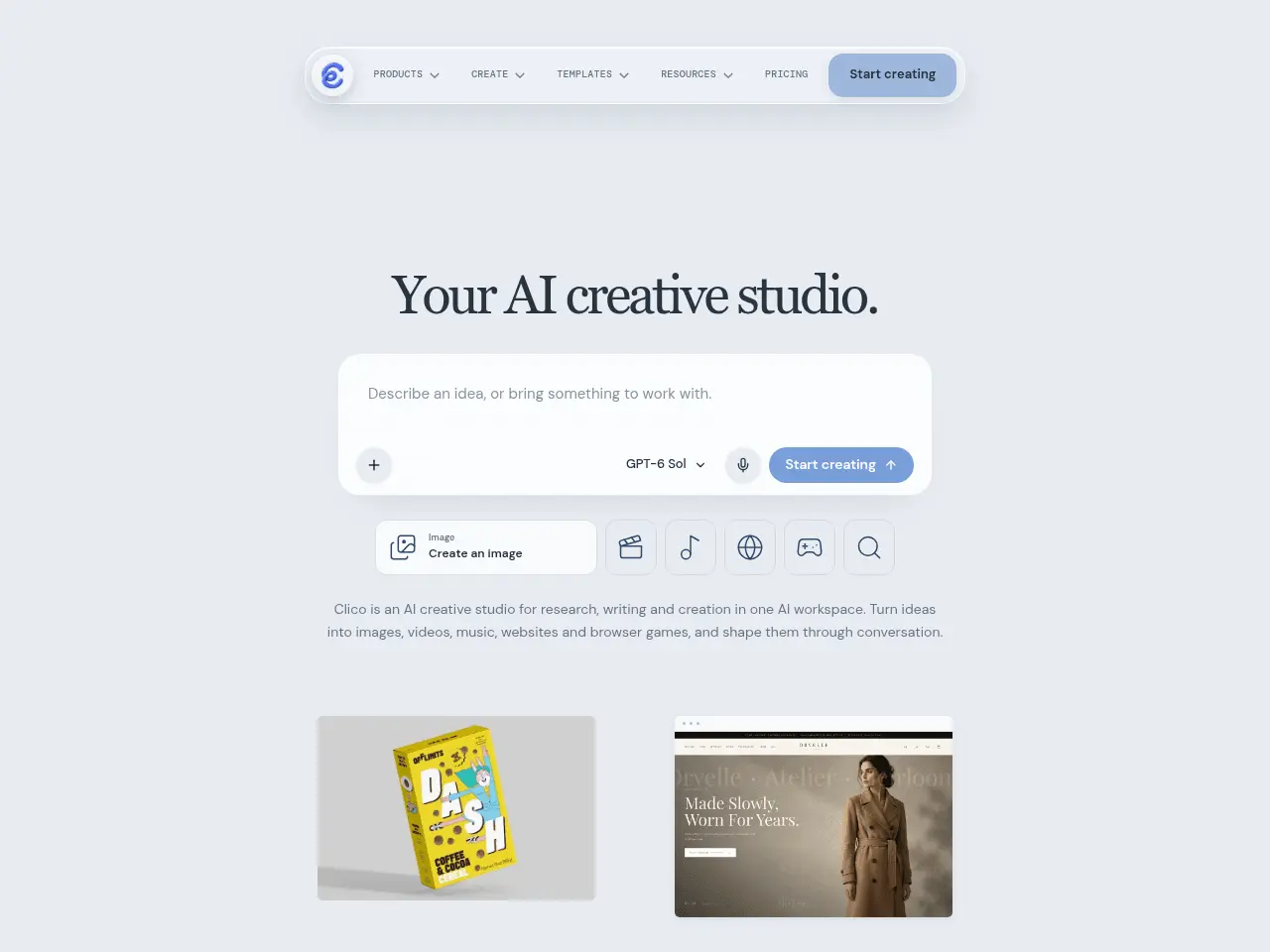
Clico is an AI creative workspace designed to handle a range of tasks through conversational prompts. Its tools cover creative outputs such as images, videos, music, websites, and browser games. Instead of treating each format as a separate product, Clico presents them as parts of one studio.
The platform also provides access to multiple third-party models. This matters because different models can be better suited to different tasks, styles, and workflows. Clico’s model selection and routing aim to let users work across those capabilities from a single interface, rather than maintaining separate accounts for each experiment.
Clico may be especially appealing when a project requires multiple types of content. A small business, for example, could explore a product image, a promotional clip, and a simple landing page as parts of the same campaign. The platform’s range does not mean that every output will be ready for publication without review. As with other generative tools, results can vary, and users should check quality, accuracy, rights, and brand fit before using them commercially.
Clico’s feature set spans several creative tasks. The names below describe the capabilities associated with the product; availability can depend on plan, model access, and the credits required for each generation.
The Clico AI image generator helps users create images from written descriptions. A prompt can specify the subject, setting, visual style, lighting, composition, and intended use. It can be used for concept art, social media visuals, campaign mockups, or illustrations.
The Clico AI image editor is designed to modify or refine existing visuals. Editing tasks may include changing a background, adjusting a subject or style, or exploring variations. Clear prompts that describe both what should change and what should remain can help make edits more predictable.
For users who want to understand or reuse a visual concept, the Clico Image-to-prompt workflow is a useful approach to explore. It analyses an image and produces a text description that can serve as a starting point for new generations. The generated prompt may need editing: image interpretation is not always exact, and fine details, text, or the original artist’s intent may not be captured reliably.
The Clico AI video generator creates video from prompts, while Clico Image to video turns a still image into a moving clip. These approaches can help users prototype scenes, make short visual assets, or add motion to an existing image.
The Clico AI video editor covers video-focused editing workflows. Depending on the available model and task, users may be able to create or refine clips from instructions. Generative video can be inconsistent in motion, continuity, and fine details, so reviewing the full clip is important.
Some features are aimed at more specific video formats. The Clico AI short drama generator is oriented toward short narrative content, while the Clico AI product video generator and Clico AI product launch video maker target promotional and product-focused clips. The Clico AI talking photo generator is designed to animate a portrait or photo as a speaking subject. The Clico AI UGC video generator aims to support creator-style promotional videos.
These tools can speed up concept development, but they should not be treated as a substitute for review. For brand work, check whether the final visuals, voice, product details, and claims are accurate and appropriate. If a generated video depicts a real person, consider consent and disclosure requirements before publishing.
Clico extends beyond conventional image and video work. The Clico AI website builder lets users explore website creation through conversational instructions. It may help with a first draft, landing-page concept, or simple web experience. Any site intended for real customers should be checked for functionality, accessibility, privacy, security, and accurate business information.
The Clico AI game maker supports the creation of browser-game concepts. This can be useful for prototypes, simple interactive experiments, or playful promotional ideas. Users should test the finished experience in the browsers and devices their audience uses.
For audio projects, the Clico AI music generator can help create music from instructions. The Clico Audio visualizer focuses on visual elements that accompany audio. Music and audio outputs should be reviewed for suitability and licensing terms before commercial use.
The Clico AI 3D model generator is intended to help create three-dimensional assets. As with other generated 3D content, check the geometry, textures, scale, and compatibility with the software or production pipeline in which the model will be used.
A typical workflow begins by opening Clico in a browser, desktop app, or Chrome extension and choosing a task. For example, a user might start with chat to develop a campaign idea, switch to an image tool to make a visual, and then use a video workflow to animate or adapt that asset.
First, select the relevant tool, model, or persona. Then describe the intended result, including details such as subject, style, audience, format, and constraints. For image-to-video or image-to-prompt tasks, upload the image you want to use. For research or document-based work, attach supported files and specify what you need extracted or produced.
Review the output before spending more credits on revisions. If the first result misses the mark, refine the prompt with concrete changes rather than rewriting it vaguely—for example, specify the camera angle, background, duration, or visual elements to keep. Model choice matters: the same prompt can produce different results across models, and availability is plan-dependent.
For websites and games, describe the intended experience and test the result in the browser. Pro and Max subscribers can download source code. Since Clico does not include backend services, user accounts, or payment processing, plan for external development or services if the project needs those features.
The core workflow is conversational: describe the task, choose the relevant creative direction or mode, review the result, and refine it. A practical process looks like this:
A prompt such as “Make a short product-launch video for a reusable water bottle” leaves many creative decisions open. A more useful brief might describe the bottle’s colour and material, the audience, the visual setting, the key benefit, the overall tone, and the desired aspect ratio. Specific instructions give the model a clearer target, though they cannot guarantee a perfect result.
Clico’s listed plans are organised around monthly credits and access to models and creative modes. The pricing information below reflects the plan details available for this review; prices and included features can change, so check Clico’s pricing page before subscribing.
| Plan | Listed price | Included credits | Listed access |
| Free | $0/month | 200 credits/month | 8 chat models, 16 image models; Chat and Image modes |
| Pro | $16/month, or $192/year billed annually | 2,000 credits/month | 30 chat models, 19 image models, 24 video models; Chat, Image, and Video modes |
| Max | $40/month, or $480/year billed annually | 5,000 credits/month | Same listed model access as Pro, with 2.5 times its credit allowance |
The Free plan lets you try the product, but it has fewer credits and does not include access to video mode. Pro expands the model selection and adds video modes. Max is designed for users who need a larger monthly credit allowance while retaining the same listed model access as Pro.
Credits are shared across Clico’s web experience, Chrome extension, and Mac desktop app. Unused credits do not roll over, according to the listed pricing information. Annual subscriptions are billed upfront, with credits issued monthly. Payments are handled through Stripe, and cancellation takes effect at the end of the current paid period. Since different generations may consume different amounts of credits, users should consider their expected workload rather than comparing plans by total credits alone.
Creators and small marketing teams can use Clico to brainstorm campaign visuals, produce draft images, and explore short-form video concepts. A single workspace may be convenient when a campaign needs several formats. Human review is still necessary to ensure the final assets align with the brand and convey the intended message.
The product-video tools can help businesses explore launch concepts, showcase product features, or create rough promotional clips. They may be most helpful during ideation and early production, particularly when a team wants to test several creative directions before committing to a larger shoot.
Entrepreneurs can use the website builder to develop an initial page idea or create a draft from a written brief. This can help turn an idea into something tangible. Before a site goes live, review its copy, links, forms, privacy practices, mobile layout, accessibility, and any code or integrations it relies on.
The short-drama and talking-photo workflows can support experiments in narrative content or character-led clips. These outputs can be useful for prototypes and creative exploration. If a project uses a real person’s image or voice, permission and responsible disclosure are important considerations.
Students, hobbyists, and independent creators can use image, music, game, and 3D tools to explore ideas quickly. Clico’s variety may help someone test different media without changing platforms. It is still wise to check assignment requirements, usage rights, and whether generated material needs to be disclosed.
The best alternative depends on the task. Someone focused on image creation may prefer a specialised image-generation platform; a video-first creator may want a dedicated AI video service; and a business building a production website may need a conventional site builder with robust hosting and integrations.
These alternatives do not necessarily match Clico feature-for-feature. The best comparison depends on whether the user values a unified workspace or prefers a deeper, more focused tool for a single medium.
When comparing options, consider the formats you need, output quality, level of control, credit or usage limits, export options, collaboration features, and commercial terms. A broad workspace such as Clico may be convenient for experimenting across formats. At the same time, specialised products can be a better fit when a particular output requires advanced editing or a well-established production workflow.
Pricing structures also differ. Some tools charge subscriptions, others use credits, and some combine the two. Compare the cost of the work you actually plan to do, not just the advertised monthly price. For example, frequent video generation may make a credit allowance more important than a large selection of image models.
Clico is a versatile AI creative workspace for people who want to experiment with multiple content formats. Its combination of image, video, audio, website, game, and 3D tools could appeal to creators and small teams who value a unified, prompt-driven experience.
Its value depends on how well its outputs fit your needs and how quickly you use credits. The Free plan lets you explore the basics, while Pro and Max offer broader access and higher monthly allowances. Before paying, check the current plan details and estimate how often you will generate each type of content.
Clico is best approached as a creative assistant and prototyping studio rather than a guarantee of publish-ready work. It can help turn ideas into first drafts and explore different directions; careful editing, fact-checking, and quality control remain part of the process.
Clico’s strongest case is convenience: it brings chat, research, image and video generation, music, websites, games, and additional creative tasks under one roof. That makes it worth considering for creators and small teams who regularly switch between media types and want a shared place to experiment with different AI models.
The trade-offs are the learning curve, credit-based usage, and dependence on third-party model availability. Clico is also not a substitute for a full web development stack when a project requires accounts, payments, or backend logic. The Free plan offers a way to explore selected capabilities; users who need video or higher credit allowances should compare Pro and Max against their expected usage. Overall, Clico is best understood as a flexible AI creative studio for ideation and prototyping, not a guarantee that every production workflow can be completed inside a single app.
The content provided on this site, AISoftRadar, specifically Clico AI, is sourced from the internet. We do not guarantee the accuracy or completeness of any external links, nor do we exercise actual control over the destinations to which these links point. At the time of indexing (2026-11-08 9:37 PM), the content on the linked pages was compliant and lawful. Should any content on these pages subsequently become non-compliant or illegal, please contact the site administrator to request its removal. AISoftRadar assumes no liability in this regard.


