![Dextr App usage screenshot[1]](https://aisoftradar.com/wp-content/uploads/2026/06/1781112681-dextr_2.webp)
![Dextr App usage screenshot[2]](https://aisoftradar.com/wp-content/uploads/2026/06/1781112678-dextr_3.webp)
![Dextr App usage screenshot[3]](https://aisoftradar.com/wp-content/uploads/2026/06/1781112676-dextr_4.webp)
![Dextr App usage screenshot[4]](https://aisoftradar.com/wp-content/uploads/2026/06/1781112674-dextr_5.webp)
![Dextr App usage screenshot[5]](https://aisoftradar.com/wp-content/uploads/2026/06/1781112669-dextr_7.webp)
![Dextr App usage screenshot[6]](https://aisoftradar.com/wp-content/uploads/2026/06/1781112666-dextr_8.webp)
![Dextr App usage screenshot[7]](https://aisoftradar.com/wp-content/uploads/2026/06/1781112664-dextr_9.webp)
![Dextr App usage screenshot[8]](https://aisoftradar.com/wp-content/uploads/2026/06/1781112661-dextr_10.webp)
![Dextr App usage screenshot[9]](https://aisoftradar.com/wp-content/uploads/2026/06/1781112659-dextr_11.webp)
![Dextr App usage screenshot[10]](https://aisoftradar.com/wp-content/uploads/2026/06/1781112657-dextr_12.webp)
![Dextr App usage screenshot[11]](https://aisoftradar.com/wp-content/uploads/2026/06/1781112655-dextr_13.webp)
![Dextr App usage screenshot[12]](https://aisoftradar.com/wp-content/uploads/2026/06/1781112652-dextr_1.webp)

Dyad App Builder - V0.43.0
Build powerful AI apps locally with zero lock-in. Dyad lets you design, code, and deploy full-stack applications using any model, with total control.
LOADING

Dextr is a smart iOS personal CRM that transforms your contacts into a rich, visual relationship map so you never forget a detail or connection again.
113.3 MB 0 Already downloaded"> Mobile view
In an increasingly connected but physically disconnected world, managing relationships has never been more complicated. The default contact applications on our smartphones were designed for a bygone era, an era where simply storing a 10-digit phone number and an email address was enough. Today, we need context. We need to remember where we met, who introduced us, our partner’s name, and what we discussed during our last coffee meeting.
Enter Dextr, a beautifully designed personal CRM (Customer Relationship Management) application specifically built for iOS devices (iPhone and iPad). Dextr is revolutionising how we manage our personal and professional networks by transforming a static list of names into a dynamic, visual, and highly actionable relationship map.
In this comprehensive, 2000+ word guide, we will dive deep into everything Dextr has to offer. We will explore its core functions, provide a step-by-step guide to using it, analyse its application scenarios, weigh its pros and cons, and compare it with the best alternative AI and CRM tools on the market today.
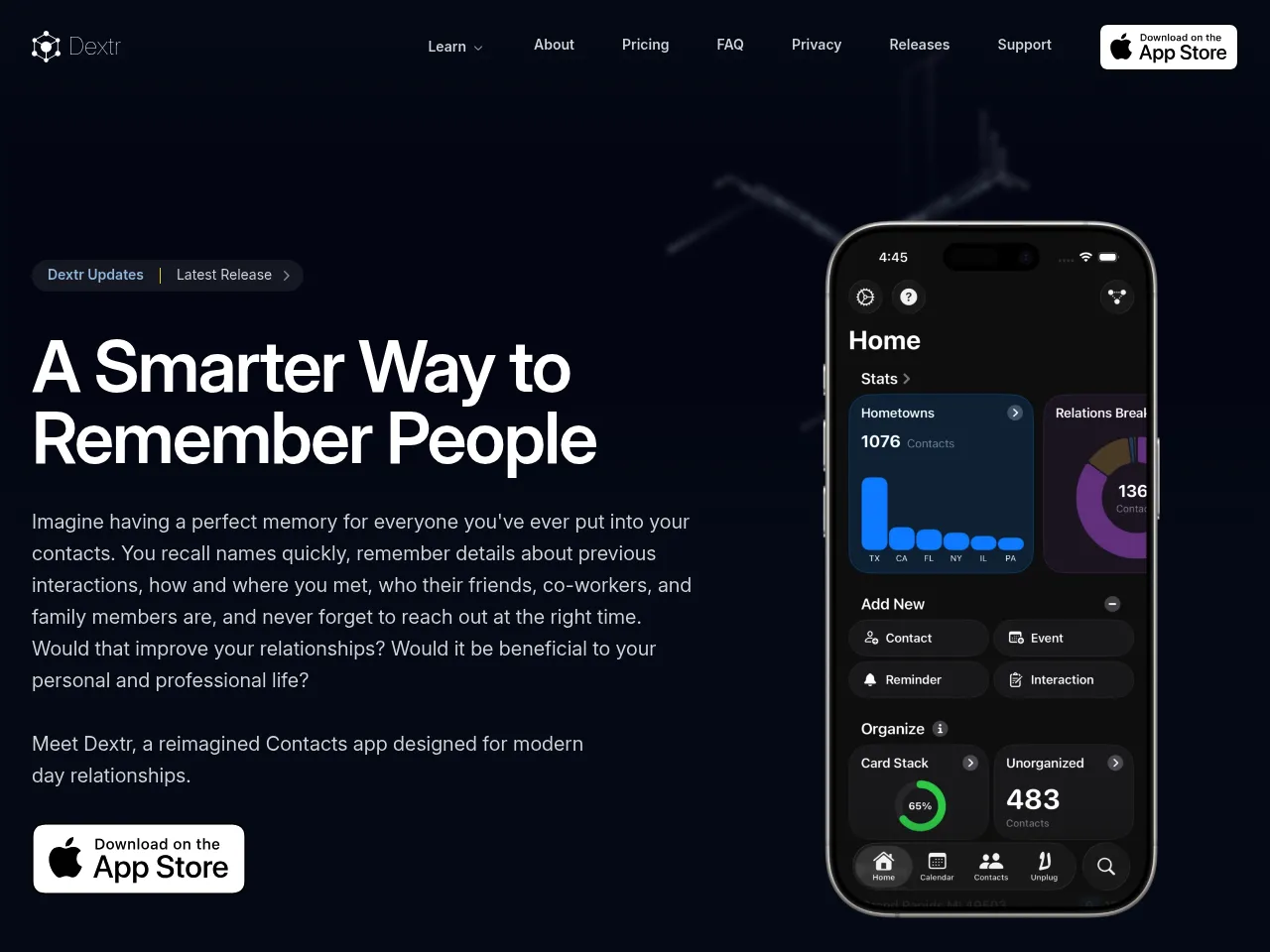
Justification: Dextr moves beyond standard digital address books by acting as a sophisticated personal Customer Relationship Management (CRM) tool. It utilises smart categorisation, interactive visual relationship mapping, and data insights to help users strategically manage their personal and professional networks.
Before diving into Dextr's features, it is vital to understand the problem it solves. According to Dunbar's number, the human brain is generally only capable of maintaining around 150 stable social relationships. Yet, the average professional in 2026 has thousands of contacts spanning LinkedIn, email, and their phone's address book.
When you meet someone at a networking event, a conference, or even a child's soccer game, you might exchange numbers. Six months later, that person reaches out, and you draw a blank. Who are they? Where did we meet? What do they do?
Traditional contact apps fail because they are flat text files. A personal CRM like Dextr adds a Z-axis: Context. By logging not just the “who” but the “where, when, and how,” Dextr acts as a secondary brain for your social life. It leverages smart data organisation to ensure that you treat every relationship with the intention and care it deserves.
Dextr is packed with features that elevate it far above the default Apple Contacts app. Here is a detailed breakdown of its main functionalities:
One of the most striking features of Dextr is its capability to map relationships. Instead of a linear list, Dextr allows you to connect contacts to one another. The app generates a visual “mind map” (nodes connected by lines) representing your network. If you know five people from a specific company or three people in the same friend group, you can visually link them. This helps you understand the architecture of your network and see who your “super-connectors” are.
Organisation is the cornerstone of any good CRM. Dextr allows users to create highly customizable tags and groups. You can tag someone as an Investor, a Web Designer, or a Tennis Partner. These tags are instantly searchable and filterable. If you suddenly need a graphic designer in your network, you don't have to scroll through thousands of names trying to jog your memory; you simply filter by your custom tags.
How many times have you travelled to a city and wondered, “Who do I know in Chicago?” Dextr integrates geographic data into your contacts. You can associate people with specific cities, countries, or even specific businesses. Furthermore, the “First Met” feature lets you log the exact date, location, and time you first connected with someone. Dextr keeps the story behind every name intact, ensuring you never have to sheepishly ask, “Remind me how we know each other?”
Dextr turns your raw contact data into actionable insights. The app features a dedicated dashboard that displays stats and charts revealing hidden patterns in your network. It tracks how quickly your network is growing and can help highlight which relationships might be growing cold and need your attention. By gamifying network management through data visualisation, it encourages you to be a more proactive connector.
Moving beyond purely digital management, Dextr actively encourages real-world relationship building. The app includes a feature to find local events near you, increasing your chances of meeting new people and expanding your network. It bridges the gap between digital management and in-person connection.
In the age of AI and data scraping, privacy is paramount. Dextr operates on a strict “Your Data, Your Way” philosophy. Contact information is highly sensitive, so Dextr is built as a self-contained application. Your data never leaves your device, is not sold to third-party advertisers, and is not fed into external AI training models without your consent. It syncs securely via your own personal Apple iCloud account, ensuring that you maintain 100% control over your digital rolodex.
For power users, Dextr is fully optimised for the iPad and iPad Pro. It utilises the larger screen real estate to show wider relationship graphs, more detailed contact cards, and an intuitive layout that supports both light and dark modes.
Getting started with a CRM can feel overwhelming, but Dextr is designed to be frictionless. Here is how to integrate Dextr into your daily workflow:
Note: Pricing models on the App Store are subject to change, so it is always recommended to check the live App Store page for the most current rates.
Historically, premium personal CRM apps like Dextr operate on a “Freemium” model.
Dextr is a versatile tool that adapts to a variety of lifestyles. Here are the most prominent use cases:
Sales is fundamentally about relationships. A real estate agent meets hundreds of prospective buyers and sellers a year. Using Dextr, an agent can tag contacts by neighbourhood interest (DowntownCondos), budget (HighNetWorth), and timeline (LookingInSpring). Remembering that a client has a Golden Retriever and needs a fenced yard, as logged in Dextr, can be the difference between closing a deal and losing a client.
People who run local meetups, church groups, or non-profits interact with a massive influx of new faces. Dextr’s “Local Events” and “First Met” features are perfect for organisers who need to remember exactly which volunteer orientation someone attended, and who they are related to within the community.
Some individuals thrive on introducing people to one another. Dextr's visual relationship mapping is built specifically for this persona. A super-connector can look at their Dextr graph, identify a talented software developer in one node, and an angel investor looking for tech startups in another, and facilitate an introduction.
Managing a household often means managing a micro-community. Parents deal with teachers, coaches, paediatricians, and other parents. As one App Store reviewer noted, Dextr is perfect for remembering the names of your kids' friends' parents. Tagging contacts by SoccerTeam or PTA eliminates the social anxiety of forgetting names at school events.
For individuals who struggle with working memory or object permanence (often seen in ADHD), “out of sight” truly means “out of mind.” Friends can easily be forgotten, not out of malice, but out of brain chemistry. A personal CRM acts as a necessary prosthetic for the brain, sending gentle reminders to maintain relationships and providing a secure place to store social data that might otherwise slip away.
Every application has its strengths and limitations. Here is an objective look at Dextr:
While Dextr is fantastic for iOS purists, the personal CRM and AI contact management space is highly competitive. Here are five top alternatives and how they compare:
The digital age has paradoxically made us more connected yet more prone to losing touch. Our address books have become digital graveyards of forgotten interactions. Dextr steps into this void not by trying to be an overly aggressive, corporate sales machine, but by being a thoughtful, beautifully designed assistant for your social and professional life.
Its standout feature, the visual relationship graph, is a game-changer for visual learners and “super-connectors” who need to see how their world fits together. Furthermore, its uncompromising stance on privacy ensures that your most valuable asset (your network) remains firmly under your control and is stored securely on your own devices.
While it does require a degree of manual discipline to input the rich data (tags, locations, first met details) that makes the app shine, the return on that investment is immense. Remembering a spouse's name, asking about a recent vacation you logged in your notes, or knowing exactly who to call when you visit a new city are the small, thoughtful actions that build incredible careers and deep, lifelong friendships.
If you are an iOS user who is tired of scrolling through hundreds of forgotten names and wants to bring intentionality, organisation, and a touch of visual magic to your relationships, Dextr is undeniably one of the best personal CRM apps you can download today.